Free Tax Calculator: Sales Tax & GST Calculator
Calculating tax on a purchase, quotation or invoice is usually a simple percentage calculation, but the numbers can become confusing when prices are shown either before or after tax. A customer may see a tax-exclusive price, a retailer may quote a GST-inclusive amount, or a business may need to separate the taxable value from the tax component on an invoice.
A Free Tax Calculator can make these calculations easier by calculating the tax amount, final price, or pre-tax value from the figures you enter. For Indian transactions, the calculator can also help with common GST calculations such as adding GST to a taxable amount or removing GST from a tax-inclusive price.
The important distinction is between tax arithmetic and tax treatment. A calculator can perform the mathematical calculation based on an entered rate, but it cannot decide whether that rate legally applies to a particular product or service. GST classification, exemptions, place of supply and other requirements should be checked using current official information when they matter.
What Is a Sales Tax & GST Calculator?
A Sales Tax & GST Calculator is an online percentage calculator that helps determine the tax amount associated with a price. It can be used to add tax to a pre-tax amount or work backward from a tax-inclusive amount.
The basic calculation for adding tax is:
Tax Amount = Taxable Amount × Tax Rate ÷ 100
When tax is added to the taxable amount:
Final Amount = Taxable Amount + Tax Amount
For example, if a taxable amount is ₹10,000 and the assumed tax rate is 18%:
Tax = ₹10,000 × 18 ÷ 100 = ₹1,800
Final Amount = ₹10,000 + ₹1,800 = ₹11,800
This is the mathematical calculation. Whether 18% is actually the applicable GST rate for a particular transaction is a separate question that requires verification.
What Can a Free Tax Calculator Help You Calculate?
A tax calculator is useful when you need a quick calculation without manually repeating percentage formulas.
- Tax added to a pre-tax price.
- Tax included in a tax-inclusive price.
- Final price after adding tax.
- Pre-tax value represented by a tax-inclusive amount.
- Tax amounts under different hypothetical rates.
- Basic GST calculations for shopping and quotations.
- Arithmetic checks for invoice amounts.
Consumers can use the calculator to estimate what they may pay after tax. Freelancers and small businesses can use it to check basic quotation arithmetic. It can also be useful for understanding how much tax is represented by a tax-inclusive price.
For actual tax compliance, however, a calculator should support rather than replace the applicable accounting records, invoice requirements and official tax rules.
GST vs. Sales Tax: Why the Terminology Matters
The term sales tax is commonly used in searches to describe a tax calculated as a percentage of a purchase price. India uses the Goods and Services Tax, or GST, framework for supplies covered by the applicable GST laws.
Therefore, a search for a "Sales Tax Calculator" may lead to a general percentage-based tax tool, while an Indian user may actually be looking for a GST calculation.
For Indian GST transactions, the applicable treatment depends on the nature and classification of the supply and other relevant circumstances. The calculator can perform the arithmetic once the appropriate taxable amount and rate have been established.
For current GST rates, classifications and legal requirements, check the latest information published by the relevant official GST and CBIC authorities.
How GST Is Calculated
Once the taxable value and applicable GST rate are known, the mathematical calculation is straightforward.
Suppose the taxable value is ₹5,000 and the assumed GST rate is 18%.
| Calculation | Amount |
|---|---|
| Taxable value | ₹5,000 |
| GST at 18% | ₹900 |
| Total including GST | ₹5,900 |
The tax amount is calculated as:
₹5,000 × 18 ÷ 100 = ₹900
The tax-inclusive amount is:
₹5,000 + ₹900 = ₹5,900
This example uses 18% only as an illustration. It does not mean that 18% applies to every product or service.
How to Add GST to a Price
Adding GST is appropriate when the amount you have is the taxable value before GST.
- Enter the amount before tax.
- Enter the applicable GST rate.
- Calculate the tax amount.
- Add the tax to the taxable value.
- Review the final tax-inclusive amount.
For example, suppose a service has a taxable value of ₹20,000 and the applicable rate for the transaction is assumed to be 18%.
GST = ₹20,000 × 18 ÷ 100 = ₹3,600
Total = ₹20,000 + ₹3,600 = ₹23,600
The calculated tax-inclusive amount is therefore ₹23,600 under these assumptions.
You can perform this calculation using the Sales Tax & GST Calculator.
How to Remove GST From a Tax-Inclusive Price
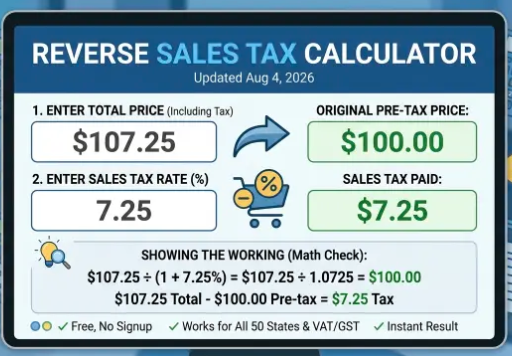
Removing GST from an inclusive price is different from simply subtracting the GST percentage.
Suppose a price of ₹11,800 already includes 18% GST. The taxable value is calculated using:
Taxable Value = Tax-Inclusive Amount ÷ (1 + Tax Rate as a Decimal)
For 18% GST:
Taxable Value = ₹11,800 ÷ 1.18 = ₹10,000
The GST included in the amount is:
₹11,800 − ₹10,000 = ₹1,800
| Component | Amount |
|---|---|
| Tax-inclusive price | ₹11,800 |
| Taxable value | ₹10,000 |
| GST included | ₹1,800 |
Why You Should Not Simply Subtract 18% From a GST-Inclusive Price
This is one of the most common mistakes in reverse GST calculations.
Suppose ₹1,000 is the original taxable value and 18% GST is added:
₹1,000 × 18% = ₹180
The tax-inclusive price becomes ₹1,180.
If you now subtract 18% of ₹1,180, the calculation gives:
₹1,180 × 18% = ₹212.40
Subtracting that amount produces ₹967.60, not ₹1,000.
The reason is that the original 18% was calculated on ₹1,000, while the reverse calculation starts with ₹1,180. To recover the original taxable value, divide the inclusive amount by 1.18.
CGST, SGST, UTGST and IGST
GST transactions can involve different tax components depending on the nature of the supply and the applicable GST framework.
| Component | General purpose |
|---|---|
| CGST | Central component used in applicable intra-State supplies |
| SGST | State component used in applicable intra-State supplies |
| UTGST | Union Territory component applicable in relevant cases |
| IGST | Generally used for applicable inter-State supplies |
For an illustrative intra-State transaction where the combined GST rate is 18%, the mathematical tax may be represented as 9% CGST and 9% SGST or the applicable UTGST component.
For an illustrative inter-State transaction at the same combined rate, the tax may instead be represented as 18% IGST.
The exact tax treatment depends on the transaction and applicable law. Do not automatically split every GST amount into CGST and SGST without first determining the nature of the supply.
How to Use the Sales Tax & GST Calculator
- Open the Sales Tax & GST Calculator.
- Enter the amount you want to calculate.
- Select the appropriate calculation mode, such as adding or removing tax.
- Enter the applicable tax rate.
- Review the taxable amount, tax amount and final amount.
- For an actual transaction, compare the result with the invoice and applicable official requirements.
Before entering a rate, make sure you know whether the amount is tax-exclusive or tax-inclusive. Choosing the wrong calculation direction can produce a mathematically correct result for the wrong question.
GST-Inclusive vs. GST-Exclusive Prices
Knowing whether tax is already included in a displayed price is essential when comparing products or quotations.
| Price Type | Illustrative Example |
|---|---|
| GST-exclusive | ₹1,000 + 18% GST = ₹1,180 |
| GST-inclusive | ₹1,180 already includes ₹180 GST |
If one seller quotes ₹1,000 before GST and another quotes ₹1,180 including GST, the two prices should not be compared directly until they are placed on the same tax basis.
This distinction is particularly useful when comparing online shopping prices, supplier quotations and business purchases.
How Discounts Affect GST Calculations
A discount can change the amount on which tax is calculated, but the tax treatment of discounts depends on the applicable GST provisions and the circumstances of the transaction.
For a simplified mathematical illustration, suppose:
- Original price = ₹10,000
- Discount = 10%
- Discount amount = ₹1,000
- Illustrative discounted value = ₹9,000
- Illustrative GST rate = 18%
The calculated GST would be:
₹9,000 × 18 ÷ 100 = ₹1,620
The calculated total would therefore be:
₹9,000 + ₹1,620 = ₹10,620
This is a simplified example showing the arithmetic when the discount reduces the amount used for the calculation. It should not be treated as a universal statement about the legal GST treatment of every discount or promotional arrangement.
If you regularly calculate both discounts and tax, a GST + Discount Calculator, where available, can be useful for testing combined scenarios.
GST Calculations for Invoices
A calculator can help check the arithmetic on a basic invoice by comparing the taxable value, tax amount and total.
For example, suppose an illustrative invoice contains a taxable value of ₹25,000 and an assumed GST rate of 18%.
| Invoice Element | Illustrative Amount |
|---|---|
| Taxable value | ₹25,000 |
| GST at 18% | ₹4,500 |
| Total invoice amount | ₹29,500 |
If the applicable structure were an illustrative 9% CGST plus 9% SGST, the ₹4,500 tax would mathematically be divided into ₹2,250 CGST and ₹2,250 SGST.
However, invoice compliance involves more than arithmetic. Businesses may need to consider classification, place of supply, exemptions, reverse-charge provisions, documentation and other applicable requirements.
How GST Rates Are Determined
A calculator should not be treated as the authority that determines the correct GST rate for a product or service.
The applicable rate can depend on the legal classification of the supply and the conditions attached to that classification. For goods, the relevant HSN classification may matter. For services, the applicable service classification and other circumstances may be relevant.
Therefore, the correct workflow is to first establish the applicable tax treatment using current official information and then use the calculator to perform the arithmetic.
Rates, classifications, notifications and other tax requirements can change. Check the latest information from the relevant official GST or CBIC authority before relying on a rate for compliance purposes.
Practical Shopping Example
Suppose an online store lists a product at ₹2,500 before GST and, for illustration, the applicable rate is 18%.
The tax would be:
₹2,500 × 18 ÷ 100 = ₹450
The tax-inclusive amount would be:
₹2,500 + ₹450 = ₹2,950
If another seller displays ₹2,900 as a tax-inclusive price, comparing ₹2,500 directly with ₹2,900 would not be a like-for-like comparison. Converting both prices to the same tax basis gives a clearer picture of the actual amounts.
Practical Example: Working Back From a Budget
Reverse GST calculations can also be useful when you have a fixed total budget.
Suppose your total budget is ₹50,000 including an assumed GST rate of 18%.
The estimated taxable value is:
₹50,000 ÷ 1.18 ≈ ₹42,372.88
The tax component is approximately:
₹50,000 − ₹42,372.88 ≈ ₹7,627.12
This calculation helps illustrate how a tax-inclusive budget can be divided between the underlying taxable amount and the tax component.
Common GST Calculation Mistakes
- Using the wrong tax rate: A calculator cannot correct an incorrect rate entered by the user.
- Applying tax to the wrong amount: Make sure you know whether the calculation starts with the original, discounted or tax-inclusive amount.
- Subtracting the tax percentage from an inclusive price: Reverse GST calculations normally require division by 1 plus the tax rate expressed as a decimal.
- Confusing CGST and SGST with IGST: The applicable tax structure depends on the nature of the supply.
- Ignoring tax treatment of additional amounts: Shipping, packaging, handling and other charges may require specific treatment depending on the transaction.
- Assuming every transaction is taxable: GST treatment can depend on the supply and applicable provisions.
- Treating a calculator as tax advice: A mathematical result does not determine the legal treatment of a transaction.
How to Get a More Reliable Calculation
- Identify the correct amount: Determine whether you are starting with a pre-tax or tax-inclusive price.
- Verify the applicable rate: Use current official GST information when the rate matters for a real transaction.
- Choose the correct calculation: Add tax when starting from a taxable value and remove tax when starting from an inclusive value.
- Record discounts separately: Keep the original price, discount and resulting amount clear.
- Check rounding: Compare the calculator result with the invoice or accounting system where rounding affects the final amount.
- Review the transaction type: For business use, confirm whether special GST provisions apply.
What the Tax Calculator Does Not Determine
A calculator performs arithmetic based on the values entered. It does not independently determine every legal or accounting aspect of a transaction.
For example, the calculator does not by itself determine:
- The legally applicable HSN or service classification.
- Whether a supply is exempt or subject to special treatment.
- Whether a transaction is intra-State or inter-State.
- Whether a reverse-charge provision applies.
- Whether a particular discount changes the value of supply under the applicable rules.
- Whether input tax credit is available.
- Whether an invoice satisfies all applicable legal requirements.
- How a tax authority would resolve a complex classification or compliance issue.
For complicated transactions, tax notices, disputes, large business transactions or questions involving specific legal treatment, verify the position using current official material or seek advice from a qualified professional.
Sales Tax & GST Calculator Quick Reference
| Calculation | Formula |
|---|---|
| Tax amount | Taxable Amount × Tax Rate ÷ 100 |
| Tax-inclusive amount | Taxable Amount + Tax Amount |
| Taxable value from an inclusive amount | Tax-Inclusive Amount ÷ (1 + Tax Rate as a Decimal) |
| Tax included in an inclusive amount | Tax-Inclusive Amount − Taxable Value |
Frequently Asked Questions
What is a Free Tax Calculator?
A Free Tax Calculator is an online tool that performs tax-related percentage calculations without requiring paid accounting software. It can help calculate tax amounts, final prices and, depending on the tool, the pre-tax value represented by a tax-inclusive amount.
How do I calculate 18% GST on ₹10,000?
Multiply ₹10,000 by 18 and divide by 100. The calculated GST is ₹1,800, making the tax-inclusive amount ₹11,800 under this assumption.
How do I remove 18% GST from ₹11,800?
Divide ₹11,800 by 1.18 to obtain the taxable value of ₹10,000. The GST included in the total is ₹1,800.
What is the formula for adding GST?
The basic formula is GST = Taxable Value × GST Rate ÷ 100. The tax-inclusive amount is the taxable value plus the calculated GST.
Can I simply subtract 18% from a GST-inclusive price?
No. If the price already includes 18% GST, the taxable value is calculated by dividing the inclusive amount by 1.18. Simply subtracting 18% from the inclusive amount does not reverse the original calculation.
Can a GST calculator tell me the correct GST rate?
No. A calculator can apply the rate you enter, but determining the correct rate may require identifying the applicable classification and other conditions. Check current official GST and CBIC information when the rate matters for a real transaction.
Can a GST calculator be used for invoices?
It can be useful for checking the arithmetic of taxable value, GST and the total invoice amount. However, actual invoicing and GST compliance require consideration of the applicable legal and accounting requirements.
Official Sources and Further Reading
Use current official GST and CBIC information when verifying tax rates, classifications, notifications or compliance requirements. A calculator should be treated as a mathematical aid rather than the final authority on tax law.
Related Calculator Tools
If your calculation involves more than tax alone, Discount Calculator provides other tools that may be relevant.
- GST + Discount Calculator for scenarios involving both discounts and tax.
- Discount Calculator for calculating sale prices and savings.
- EMI Calculator for estimating loan instalments and repayment calculations.
Choose the calculator that matches the calculation you are actually trying to perform rather than applying one formula to every financial situation.
About the Author
B. Kumar is the Founder & Developer of Discount Calculator, a website that provides online calculators and practical explanations for financial, tax, shopping and everyday calculations. The site's calculators are designed to help users understand calculations, formulas, assumptions and estimated results.
Written by: B. Kumar, Founder & Developer, Discount Calculator
Last reviewed: September 26, 2026
Important Disclaimer
Financial and tax information on Discount Calculator is provided for general educational and informational purposes. Calculator results are estimates based on user-provided information and the assumptions described on the relevant page. We do not provide personalized financial, investment, tax or legal advice. Rates, rules, fees and regulatory requirements may change. For important decisions, verify information with the relevant government authority, financial institution or qualified professional.
Conclusion
A Free Tax Calculator can make everyday tax arithmetic faster and easier. The most common calculations involve adding GST to a taxable amount, removing GST from a tax-inclusive price, identifying the tax component and comparing hypothetical tax rates.
The mathematical formulas are straightforward, but choosing the correct inputs is just as important as performing the calculation. A tax-inclusive amount must be handled differently from a tax-exclusive amount, and the applicable GST rate must be established separately from the arithmetic.
For Indian GST calculations, use current official GST and CBIC information when verifying rates, classifications and legal treatment. For simple arithmetic, the Sales Tax & GST Calculator can provide a quick calculated result based on the values and assumptions entered.
Used with the right assumptions, a tax calculator can help consumers understand prices, businesses check basic invoice arithmetic, and anyone working with GST see how a percentage translates into an actual amount.